
The Complete Guide to Smart Home Automation for Modern Homes
This guide covers what smart home automation actually means, what the key devices do, how much it costs in India, and what to watch out for before you buy anything.
Book Free Consultation Book Free Consultation
What exactly is smart home automation? It means controlling your lights, locks, cameras, and appliances from your phone or your voice, instead of doing everything by hand. For Indian homeowners, this is no longer something only rich people do. Prices have dropped, apps have become easier to use, and more Indian brands now build products for Indian homes and Indian power conditions.
This guide covers what smart home automation actually means, what the key devices do, how much it costs in India, and what to watch out for before you buy anything.
What Is IoT Home Automation, Really?
IoT stands for Internet of Things. In simple words, it means everyday objects like a light bulb or a door lock can connect to the internet and talk to each other. That is what makes IoT home automation work. Your lock can tell your app that the door just opened. Your camera can tell your phone that it saw movement.
These devices talk to each other using a few common languages, called protocols. Wi-Fi is the same network your phone uses it's simple but can slow down with too many devices. Zigbee is a low-power option built for smart home automation devices, often needing a small hub. Z-Wave is similar, known for strong range through walls. Thread and Matter are newer standards meant to make devices from different brands work together.
You don't need to memorise all of this. Just know that when a product mentions one of these terms, it is telling you how it connects to your other devices.
Smart Home Solutions vs Smart Home Automation Solutions
These two terms sound almost the same, but they point to two different ways of building a smart home.
Smart home solutions usually mean buying individual smart gadgets one at a time. A smart plug here, a smart bulb there, a camera when you feel like it. This is cheap, easy to start, and works fine for small homes or renters.
Smart home automation solutions mean something more planned. A professional looks at your whole home and sets everything up as one connected system. This costs more upfront but gives you a smoother, more reliable home, especially in larger houses or villas where many devices need to work together.
Neither approach is wrong. It depends on your home size, your budget, and how much you want everything to just work without juggling five different apps.
The Core Building Blocks of a Smart Home
Every smart home, big or small, is built from four basic parts: devices (the actual products, like lights, locks, plugs, and cameras), sensors (small parts that detect motion, temperature, water leaks, or an open door), a hub or controller (the brain that connects everything, sometimes a small box, sometimes just an app), and a network (the connection method, usually Wi-Fi, Zigbee, or Z-Wave).
Once you understand these four parts, every smart home product starts to make more sense. It is really just a device, talking through a network to a hub that knows what to do.
Home Security Alarm Systems: What They Actually Do
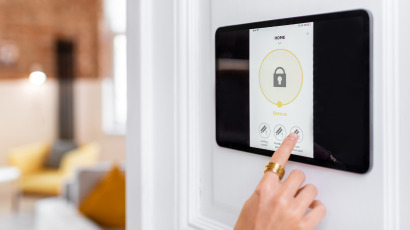
A home security alarm system is built to detect something wrong and raise an alert right away. It usually includes door and window sensors, motion sensors, a loud siren, and a connection to your phone, sometimes to a monitoring company too. Its main job is speed, reacting the moment something happens. This is different from a camera, which mostly records and lets you look back later.
Security Camera for Home: Choosing the Right Setup
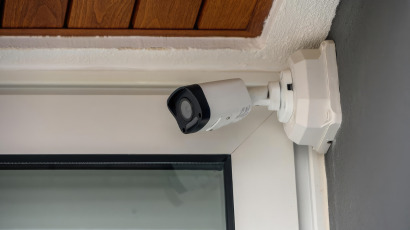
A security camera for home use gives you eyes on your property, even when you are not there. A few choices matter more than the brand name: whether it's indoor or outdoor (outdoor cameras need weatherproofing), wired or wireless (wired is more reliable, wireless is easier to install), and cloud or local storage (cloud footage is safe if the camera is stolen but usually needs a monthly fee, while local storage is free but can be removed by an intruder).
For most Indian homes, a mix works best. Outdoor cameras at the gate and main door, paired with at least one indoor camera near the living area, cover the basics without overspending.
Digital Door Locks: The Front Line of Home Security
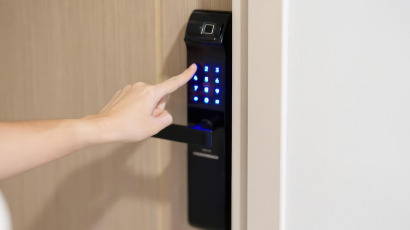
A digital door lock replaces or works alongside your regular key lock, letting you open the door with a PIN code, a fingerprint, an RFID card, or your phone. Common types include PIN code locks (simple, but codes can be shared or guessed if not changed often) fingerprint locks (fast and hard to fake, good for families), RFID card locks (useful for guests or house help, since cards can be deactivated anytime), and app-based locks (allow remote locking, useful when you forget to lock up).
Before buying, check the lock's battery backup, since most digital locks run on batteries. Also check for a manual key override, a simple safety net in case the electronics fail.
Smart Lighting, Climate, and Everyday Convenience
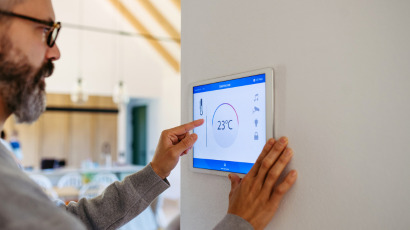
Not everything about a smart home is security. Smart lighting lets you dim, schedule, or change colors from your phone and can switch off automatically when a room is empty. Smart thermostats and AC controllers adjust cooling based on time of day or whether anyone is home. Motorised curtains can open at sunrise and close at sunset on their own. These small comforts often make a smart home feel different day to day, not just safer.
Retrofitting an Indian Home: What Actually Works
Adding smart devices to an already-built Indian home comes with a few real challenges that most guides skip over.
The neutral wire problem. Many older Indian homes only run a live wire and a load wire to the switchboard, with no neutral wire at the switch itself. Most smart touch switches need a neutral wire to stay powered. Without one, standard smart switches won't work or will flicker oddly. The fix is either to run a new neutral wire, which means opening the wall, or to choose a single-live, no-neutral switch module, some of which use a small bypass capacitor to stop LED bulbs glowing faintly when off. Ask an electrician to check your switchboard before buying, it can save you from products that don't fit your home.
Wi-Fi coverage. Indian homes with thick concrete walls often have weak Wi-Fi in far corners. A mesh router or a Zigbee-based system, which passes signal from device to device, usually works better than Wi-Fi alone for larger homes.
Power cuts and inverters. Most smart hubs and routers need constant power. If your area has frequent outages, check whether your router and hub are connected to your inverter or UPS, otherwise your smart system goes offline with the power.
Rented flats. If you're renting, look for devices that clip onto existing switches or plug into sockets, rather than ones needing permanent wiring changes your landlord may not allow.
How Much Does Smart Home Automation Cost in India?
Costs vary a lot depending on how much of your home you automate. Entry-level setups, a few smart plugs, one camera, and basic smart lighting can start under ten thousand rupees. Mid-range setups, with smart switches across multiple rooms, a video doorbell, and a couple of cameras, usually run forty to eighty thousand rupees. Full integrated systems, professionally designed across an entire villa or large apartment, including security, lighting, and climate control, can run well into several lakhs.
The biggest cost driver isn't the gadgets themselves; it's whether you need new wiring, professional installation, and how many rooms you want covered.
Getting Started: A Practical Step-by-Step Roadmap
- List your actual problems first. Better security, more convenience, or lower bills - this decides where to start.
- Pick one ecosystem. Google Home, Amazon Alexa, or a dedicated Indian brand, and stick with devices that work well with it.
- Start with security. A digital door lock and one or two cameras give the most value early on.
- Add convenience slowly. Smart lighting and plugs are easy next steps once security is sorted.
- Scale up only when it's working well. Add a few devices, test them, then expand.
Common Mistakes to Avoid
A few mistakes come up again and again: buying devices from different brands without checking if they actually work together, skipping professional installation for security-critical devices like locks and alarms, leaving default passwords unchanged on cameras and hubs, and automating everything at once instead of starting small and learning what you actually use.
Keeping Your Smart Home Secure
A smart home is only as safe as its weakest password. Use a strong, unique password for your Wi-Fi and each app, turn on two-factor authentication where offered, keep firmware updated, since updates often fix security gaps, and put smart devices on a separate network from your phones and laptops if your router allows it.
India's Digital Personal Data Protection Act now sets rules around how companies must handle personal data, including data from connected devices like cameras and smart locks. Choosing brands that are clear about where your data is stored is a simple way to stay safer.
Choosing the Right Partner for Your Smart Home Automation Solutions
Not every provider fits every home. Before choosing one, check whether they support the devices you already own, offer real after-sales service, and have local technicians who can actually visit if something breaks.
DNR Technologies works with homeowners across these needs, from single upgrades like a digital door lock or a security camera for home to fully planned smart home automation solutions for larger properties. Having a local team that understands Indian wiring and Indian homes makes the whole process far less stressful.
Closing Thought
Smart home automation in India has moved past being a novelty. It's now a practical way to feel safer, save a little on electricity, and make daily life easier, whether that means a fingerprint lock on your front door or a fully planned system running your entire home. Start small, understand your home's own quirks like its wiring, and build up from there.
Frequently Asked Questions
Question: Does home automation work during power cuts?
Answer: Most systems need power to function, so a hub without inverter backup goes offline during an outage. Battery-backed locks and sensors usually keep working on their own.
Question: Can I automate a rented flat?
Answer: Yes, using clip-on smart switches, plug-in smart plugs, and app-based locks that don't need permanent wiring changes or landlord permission.
Question: Is a subscription required?
Answer: Not always. Local storage cameras and basic smart plugs usually need none. Cloud video storage and some monitoring services do charge monthly.
Question: Which is safer, cloud or local storage for cameras?
Answer: Cloud storage protects footage if the camera is stolen. Local storage is free but can be removed with the camera during a break-in. Many homeowners use both.
Question: How long does installation take?
Answer: A few smart plugs and a camera can be set up in under an hour. A full professionally installed system usually takes a few days, depending on wiring needs.
Share:
Related Posts